This article is general guidance, not legal advice.
A call centre setup should support focused conversations through long shifts while making it easy for people to adjust their workstation and take part in team activities. Plan the desks, chairs, screens, headset storage, acoustics and shared spaces together rather than treating each seat as an isolated station.
Key Takeaways
- Plan the work area around call patterns, team size and shift handovers.
- Choose adjustable chairs and workstation layouts that can suit different users.
- Position screens, keyboards and headsets so the work area feels practical, not cramped.
- Use layout, storage and acoustic planning to limit avoidable distractions.
- Ask staff what is uncomfortable or inconvenient, then make adjustments where practical.
The 2-minute version
- Map the work: note the number of seats, call types, shift patterns and team-lead needs.
- Plan the rows: check desk spacing, chair movement, walkways and access to shared equipment.
- Set up each station: plan the chair, screen, keyboard, headset and personal storage together.
- Manage noise: consider layout, acoustic materials and spaces for calls or short discussions.
- Review with users: ask staff and supervisors what needs adjusting after the setup is in use.
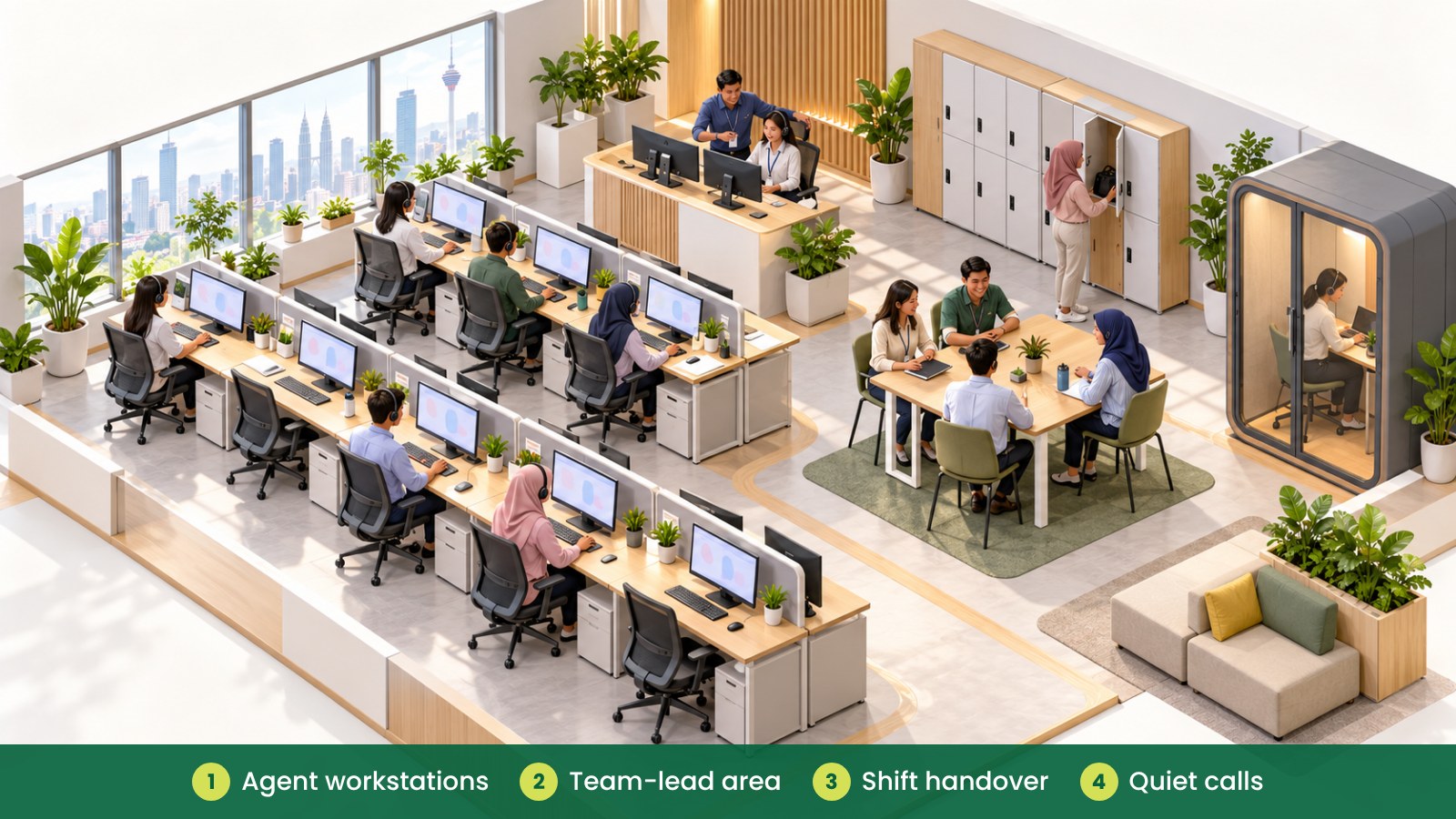
What should a call centre office include?
Call centres often need many workstations, clear team communication and reliable shift handovers. The layout should help staff concentrate on calls while giving supervisors a practical way to support the team.
Start with the way the centre operates. Consider how many people are on each shift, whether staff share desks, where supervisors need to sit and where employees can have private discussions. These answers help shape the workstation plan.
How should you plan desks for long shifts?
Give each workstation enough room for the equipment used every day: screen, keyboard, mouse, headset and any documents. If desks are shared between shifts, consider how quickly users can adjust the chair and position their equipment for the next person.
A chair with practical adjustments can make it easier for users to set up the workstation to suit them. Ask staff to try chair samples where possible, and check whether the adjustment controls are easy to understand. A suitable chair is one part of a useful setup; the desk, screen and work habits matter too.
Check that staff can move the chair without bumping into a colleague or blocking a walkway. Avoid fitting too many seats into a row just because the floor plan appears to allow it.
| Call centre area |
Purpose |
Furniture and setup to consider |
| Agent workstations |
Handle calls and update systems |
Work desks, adjustable chairs, monitor arms, headset hooks |
| Team-lead area |
Support agents and coordinate the shift |
Workstation with sightlines, small discussion table, storage |
| Quiet or private calls |
Handle sensitive or focused conversations |
Acoustic pod or booth, suitable seating, small work surface |
| Shift handover point |
Share updates between teams |
Briefing table, writable board, organised document storage |
| Personal storage |
Keep bags and personal items organised |
Lockers or shared storage units placed away from desk routes |
How should screens and headsets be arranged?
Position screens in front of the user where practical, with the keyboard and mouse close enough for comfortable use. A monitor arm may help adjust screen position when it suits the workstation. Keep cables managed so they do not tangle with chair movement or cross walkways.
Plan where headsets are stored between shifts. A hook, drawer or small storage compartment can help keep the desk clear. If the headset is shared, follow your organisation’s own cleaning and equipment-handling process.
People who use a workstation for long periods may benefit from changing posture and taking suitable breaks as part of the centre’s work routine. Avoid presenting furniture alone as a solution to discomfort; encourage staff to report recurring issues so managers can review the setup and work practices.
How can you reduce distractions without isolating the team?
Noise is part of a call centre, but layout choices may help reduce avoidable distractions. Consider how workstations face each other, where team discussions happen and whether a small acoustic area could support calls that need more privacy.
Keep printers, pantry activity and informal discussions away from the most focused work areas where possible. Soft finishes or screens may help shape the space, but check that they do not obstruct visibility, access or the office’s existing building systems.
A team lead should be able to support staff without needing to shout over the room. A nearby briefing point or small meeting area can help keep longer conversations away from active call rows.
| Planning check |
What to review |
What a practical fix might involve |
| Desk spacing |
Can chairs move without hitting people or blocking access? |
Adjust row layout or reduce overcrowding. |
| Screen and input devices |
Are screens, keyboards and mice placed for the task? |
Reposition equipment or review desk dimensions. |
| Headset storage |
Is there a clear place to keep headsets between shifts? |
Add suitable hooks, drawers or storage. |
| Noise and discussion |
Where do team chats, handovers and private calls happen? |
Set a briefing point or consider an acoustic space. |
| Staff feedback |
What do users say is difficult during a shift? |
Prioritise recurring issues and review changes. |
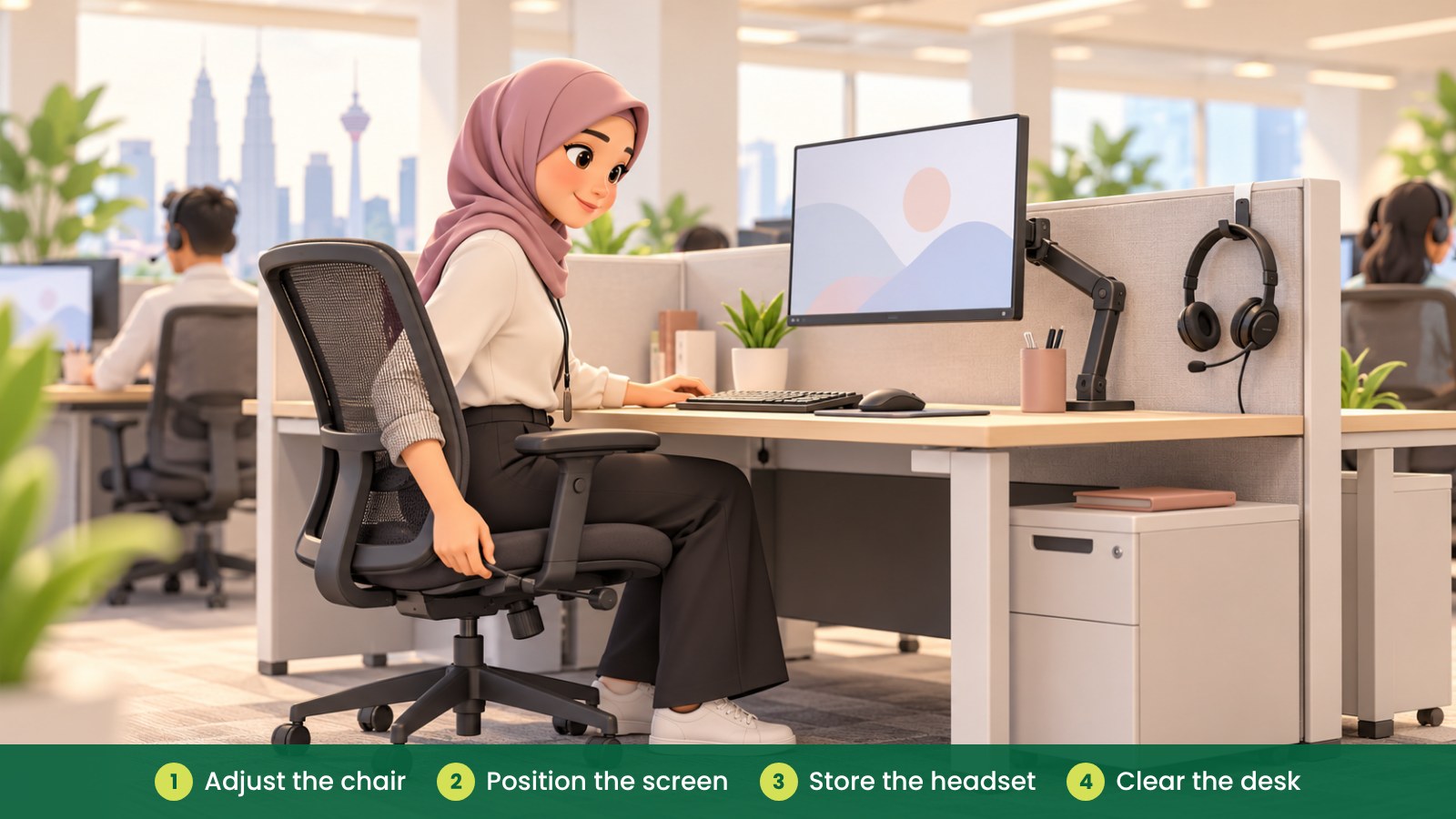
What should you check when workstations are shared?
When people use the same workstation across shifts, make adjustments simple and visible. Choose chairs and monitor arrangements that can be changed without tools where possible, and show users how to set them up.
Provide a practical place for personal items so that bags, water bottles and documents do not crowd the work surface. Agree how the workstation should be left at the end of a shift, including where headsets and shared items go.
For Malaysian workplaces, OSHA and DOSH provide workplace safety context. For a short overview, see OSHA for Offices in Malaysia. A practical workplace review can help identify issues with workstation layout and daily use.
Fictional example: a Penang customer service team
A fictional Penang team is expanding its call centre and adding shared workstations for rotating shifts. Before ordering furniture, the facility manager maps the team-lead area, briefing point, personal storage and the path employees use when arriving for work.
The team tests a chair and checks how different staff adjust it. They also move the printer away from a busy workstation row and set a dedicated place for shift handovers. After the new layout is in use, supervisors ask staff which adjustments would help most.
What common mistakes should you avoid?
- Fitting in as many desks as possible: allow space for chair movement, walkways and shared tasks.
- Using one fixed setup for every user: consider adjustable furniture and simple setup guidance for shared shifts.
- Leaving headsets and personal items loose: plan storage so desks stay usable.
- Holding every discussion beside active calls: provide a practical place for briefings and longer conversations.
- Ignoring staff feedback: ask agents and team leads what is difficult during real shifts.
- Expecting furniture to solve every concern: review work practices and recurring discomfort with the appropriate workplace support.
How can iGreen help with a call centre setup?
iGreen can help assess a call centre site, plan workstation rows and select furniture such as ergonomic chairs, desks, storage and acoustic pods. The team can also coordinate delivery and installation in Kuala Lumpur and Penang. A site assessment can help you review quantities, access, layout and the way the space will be used.
Request a site assessment from iGreen (KL and Penang).
Frequently asked questions
What chair features should a call centre consider?
Look for practical adjustments that help different users set up the chair, such as seat height and back support. Try samples with staff where possible, and check that controls are easy to use.
Should call centre desks be shared between shifts?
That depends on the centre’s operations. If desks are shared, make sure users can adjust the chair and screen, store personal items and leave the station ready for the next shift.
Can acoustic pods reduce call centre noise?
A pod can provide a separate place for selected calls or focused tasks. Suitability depends on the pod, location, building and how the team plans to use it, so review the site and product information before choosing one.
How often should managers review workstation layouts?
Review the layout when teams, equipment or work patterns change, and ask staff for feedback after adjustments. Recurring issues may need a closer workplace review.